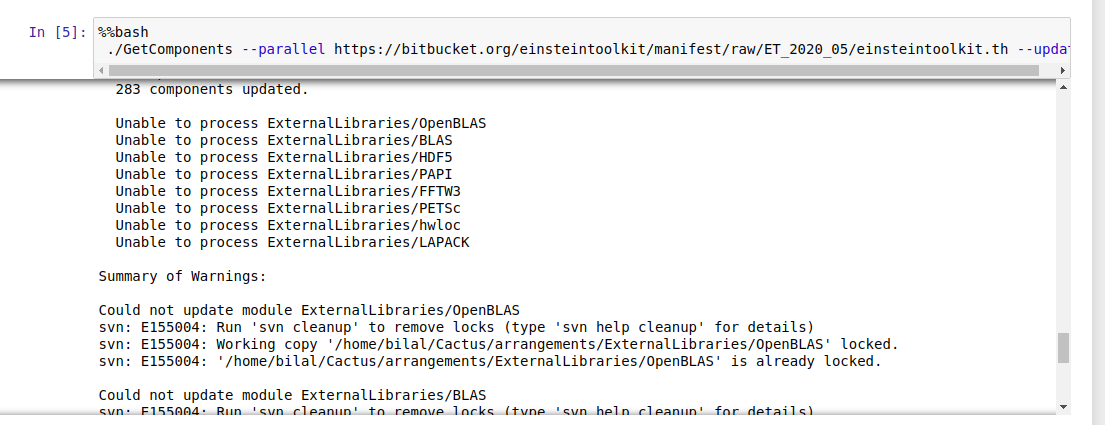
Dear Sir, I found these errors in Getcomponents.
On Sat, Jun 27, 2020 at 12:23 AM Roland Haas rhaas@illinois.edu wrote:
Hello Bilal,
I am trying to install new version of ET in jupyter notebook. I followed the instructions but get CST errors as in the screenshot.
Since multiple CactusNumerical thorns are missing, this looks to me as if the download may have failed.
Were there any errors / warnings output when you ran GetComponents?
The fastest way to fix this is most likely to run GetComponents (in the same location and with the same options as before) once more, then run "sim build" again.
Best would be to add:
2>&1 | tee GetComponents.log
at the end of the GetComponents line so that it reads:
./GetComponents --parallel https://bitbucket.org/einsteintoolkit/manifest/raw/ET_2020_05/einsteintoolki... 2>&1 | tee GetComponents.log
and similarly run sim build as:
./simfactory/bin/sim build -j2 --thornlist ../einsteintoolkit.th 2>&1 | tee sim.log
and if the failure persists please include the two files GetComponents.log and sim.log in your email since they contain the full set of error messages (which often contain information that is no longer visible on screen and hence a screenshot).
Yours, Roland
-- My email is as private as my paper mail. I therefore support encrypting and signing email messages. Get my PGP key from http://pgp.mit.edu .