
Dear all,
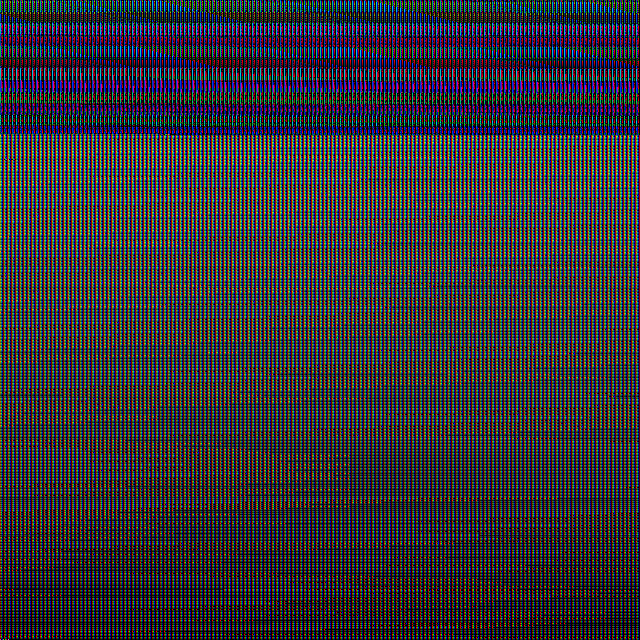
I am trying to plot and make movie for the NSNSTOHMNS Gallery example using the support scripts provided. On using the VisIt support scripts as given in the example, I do get some figures named [rho_000000000.png, ... , rho_000000231.png], but they are all usually black screens or look like tv white noise.
Details of the simulation: I ran it on a cluster with 8 cores. My run data for mp_Psi4_l2_m2_r300.00.asc and rho.xy.h5 and the sample Results given in the gallery example are of the same order of magnitude(although not identical). So I doubt any problems on the data generation end.
I am using VisIt version 3.0.2 and FFMPEG version 4.2.1, and am loading python/3.7.3.
I get these when I run the command visit -cli -nowin -s rho.movie.py
- - - - - - - - - - - - - - - - - - - - - - - - - - - - - - - - - - - - - - - - - - - - - - - - - - - -
... ... VisIt: Message - Rendering window 1... VisIt: Error - The compute engine running on crcfe01.crc.nd.edu has exited abnorm ally. VisIt: Error - Scalable Render Request Failed (VisItException) viewer: Obtained null data reader for rendered image for engine crcfe01.crc.nd.ed u. Running: engine_ser3.0.2 -idle-timeout 480 -host 127.0.0.1 -port 5600 VisIt: Message - Rendering window 1... VisIt: Message - Saving window 1... VisIt: Message - Saved rho_000000000.png ... ... s/nsnstohmns_in_saeng/output-0000/nsnstohmns/rho.xy.h5". VisIt: Message - Closed the compute engine on host crcfe01.crc.nd.edu. ffmpeg version 4.2.1 Copyright (c) 2000-2019 the FFmpeg developers built with gcc 4.8.5 (GCC) 20150623 (Red Hat 4.8.5-39) configuration: --prefix=/afs/crc.nd.edu/group/mathews/tools/ffmpeg/4.2.1 --disable-x86asm libavutil 56. 31.100 / 56. 31.100 libavcodec 58. 54.100 / 58. 54.100 libavformat 58. 29.100 / 58. 29.100 libavdevice 58. 8.100 / 58. 8.100 libavfilter 7. 57.100 / 7. 57.100 libswscale 5. 5.100 / 5. 5.100 libswresample 3. 5.100 / 3. 5.100 Unrecognized option 'crf'. Error splitting the argument list: Option not found ffmpeg version 4.2.1 Copyright (c) 2000-2019 the FFmpeg developers built with gcc 4.8.5 (GCC) 20150623 (Red Hat 4.8.5-39) configuration: --prefix=/afs/crc.nd.edu/group/mathews/tools/ffmpeg/4.2.1 --disable-x86asm libavutil 56. 31.100 / 56. 31.100 libavcodec 58. 54.100 / 58. 54.100 libavformat 58. 29.100 / 58. 29.100 libavdevice 58. 8.100 / 58. 8.100 libavfilter 7. 57.100 / 7. 57.100 libswscale 5. 5.100 / 5. 5.100 libswresample 3. 5.100 / 3. 5.100 Input #0, image2, from 'rho_%09d.png': Duration: 00:00:09.28, start: 0.000000, bitrate: N/A Stream #0:0: Video: png, rgb24(pc), 640x640, 25 fps, 25 tbr, 25 tbn, 25 tbc Unknown encoder 'theora'
- - - - - - - - - - - - - - - - - - - - - - - - - - - - - - - - - - - - - - - - - - - - - - - - - - - -
Any help would be greatly appreciated.
Thank you, best regards, Atul Kedia Physics Graduate student University of Notre Dame.

Hello Atul,
I can venture a guess. The relevant error message seems to be:
--8<-- VisIt: Message - Rendering window 1... VisIt: Error - The compute engine running on crcfe01.crc.nd.edu has exited abnorm ally. VisIt: Error - Scalable Render Request Failed (VisItException) viewer: Obtained null data reader for rendered image for engine crcfe01.crc.nd.ed u. --8<--
I have seem odd image corruption when VisIt could not read the image out of the OpenGL buffer it uses for rendering.
I would try the following:
* first try and see if you can open rho.xy.h5 in VisIt manually, you may have to make sure that the CarpetHDF5 reader is used * then make a PseudoColor plot which should show one of the stars
if this works then at least VisIt can read the files and render them.
In that case you may have to play with the "screen capture" setting of VisIt's save window functionality (which is what is used to create the images).
In the python script, add this line:
s.screenCapture = 0
and if this does not help, try
s.screenCapture = 1
If you could include one of the images that may help.
Yours, Roland
Dear all,
I am trying to plot and make movie for the NSNSTOHMNS Gallery example using the support scripts provided. On using the VisIt support scripts as given in the example, I do get some figures named [rho_000000000.png, ... , rho_000000231.png], but they are all usually black screens or look like tv white noise.
Details of the simulation: I ran it on a cluster with 8 cores. My run data for mp_Psi4_l2_m2_r300.00.asc and rho.xy.h5 and the sample Results given in the gallery example are of the same order of magnitude(although not identical). So I doubt any problems on the data generation end.
I am using VisIt version 3.0.2 and FFMPEG version 4.2.1, and am loading python/3.7.3.
I get these when I run the command visit -cli -nowin -s rho.movie.py
... ... VisIt: Message - Rendering window 1... VisIt: Error - The compute engine running on crcfe01.crc.nd.edu has exited abnorm ally. VisIt: Error - Scalable Render Request Failed (VisItException) viewer: Obtained null data reader for rendered image for engine crcfe01.crc.nd.ed u. Running: engine_ser3.0.2 -idle-timeout 480 -host 127.0.0.1 -port 5600 VisIt: Message - Rendering window 1... VisIt: Message - Saving window 1... VisIt: Message - Saved rho_000000000.png ... ... s/nsnstohmns_in_saeng/output-0000/nsnstohmns/rho.xy.h5". VisIt: Message - Closed the compute engine on host crcfe01.crc.nd.edu. ffmpeg version 4.2.1 Copyright (c) 2000-2019 the FFmpeg developers built with gcc 4.8.5 (GCC) 20150623 (Red Hat 4.8.5-39) configuration: --prefix=/afs/crc.nd.edu/group/mathews/tools/ffmpeg/4.2.1 --disable-x86asm libavutil 56. 31.100 / 56. 31.100 libavcodec 58. 54.100 / 58. 54.100 libavformat 58. 29.100 / 58. 29.100 libavdevice 58. 8.100 / 58. 8.100 libavfilter 7. 57.100 / 7. 57.100 libswscale 5. 5.100 / 5. 5.100 libswresample 3. 5.100 / 3. 5.100 Unrecognized option 'crf'. Error splitting the argument list: Option not found ffmpeg version 4.2.1 Copyright (c) 2000-2019 the FFmpeg developers built with gcc 4.8.5 (GCC) 20150623 (Red Hat 4.8.5-39) configuration: --prefix=/afs/crc.nd.edu/group/mathews/tools/ffmpeg/4.2.1 --disable-x86asm libavutil 56. 31.100 / 56. 31.100 libavcodec 58. 54.100 / 58. 54.100 libavformat 58. 29.100 / 58. 29.100 libavdevice 58. 8.100 / 58. 8.100 libavfilter 7. 57.100 / 7. 57.100 libswscale 5. 5.100 / 5. 5.100 libswresample 3. 5.100 / 3. 5.100 Input #0, image2, from 'rho_%09d.png': Duration: 00:00:09.28, start: 0.000000, bitrate: N/A Stream #0:0: Video: png, rgb24(pc), 640x640, 25 fps, 25 tbr, 25 tbn, 25 tbc Unknown encoder 'theora'
Any help would be greatly appreciated.
Thank you, best regards, Atul Kedia Physics Graduate student University of Notre Dame.
Hello Roland,
Thank you for your email. I have VisIt 3 and ETK Mayer downloaded which I believe doesn't have CarpetHDF5. How do I use the CarpetHDF5 reader? Do I need to install it from https://bitbucket.org/rhaas80/carpethdf5/src/multifile/ or is there a newer version?
As to s.screenCapture, it was by default set to 0 , I have attached a sample image. setting s.screenCapture = 1 gives empty images, so does not fix the problem.
Best regards, Atul
On Thu, Jan 23, 2020 at 5:51 PM Haas, Roland rhaas@illinois.edu wrote:
Hello Atul,
I can venture a guess. The relevant error message seems to be:
--8<-- VisIt: Message - Rendering window 1... VisIt: Error - The compute engine running on crcfe01.crc.nd.edu has exited abnorm ally. VisIt: Error - Scalable Render Request Failed (VisItException) viewer: Obtained null data reader for rendered image for engine crcfe01.crc.nd.ed u. --8<--
I have seem odd image corruption when VisIt could not read the image out of the OpenGL buffer it uses for rendering.
I would try the following:
- first try and see if you can open rho.xy.h5 in VisIt manually, you may have to make sure that the CarpetHDF5 reader is used
- then make a PseudoColor plot which should show one of the stars
if this works then at least VisIt can read the files and render them.
In that case you may have to play with the "screen capture" setting of VisIt's save window functionality (which is what is used to create the images).
In the python script, add this line:
s.screenCapture = 0
and if this does not help, try
s.screenCapture = 1
If you could include one of the images that may help.
Yours, Roland
Dear all,
I am trying to plot and make movie for the NSNSTOHMNS Gallery example
using
the support scripts provided. On using the VisIt support scripts as given in the example, I do get some figures named [rho_000000000.png, ... , rho_000000231.png], but they are all usually black screens or look like
tv
white noise.
Details of the simulation: I ran it on a cluster with 8 cores. My run data for mp_Psi4_l2_m2_r300.00.asc and rho.xy.h5 and the sample Results given in the gallery example are of the same order of magnitude(although not identical). So I doubt any problems on the data generation end.
I am using VisIt version 3.0.2 and FFMPEG version 4.2.1, and am loading python/3.7.3.
I get these when I run the command visit -cli -nowin -s rho.movie.py
... ... VisIt: Message - Rendering window 1... VisIt: Error - The compute engine running on crcfe01.crc.nd.edu has
exited
abnorm ally. VisIt: Error - Scalable Render Request Failed (VisItException) viewer: Obtained null data reader for rendered image for engine crcfe01.crc.nd.ed u. Running: engine_ser3.0.2 -idle-timeout 480 -host 127.0.0.1 -port 5600 VisIt: Message - Rendering window 1... VisIt: Message - Saving window 1... VisIt: Message - Saved rho_000000000.png ... ... s/nsnstohmns_in_saeng/output-0000/nsnstohmns/rho.xy.h5". VisIt: Message - Closed the compute engine on host crcfe01.crc.nd.edu. ffmpeg version 4.2.1 Copyright (c) 2000-2019 the FFmpeg developers built with gcc 4.8.5 (GCC) 20150623 (Red Hat 4.8.5-39) configuration: --prefix=/afs/
crc.nd.edu/group/mathews/tools/ffmpeg/4.2.1
--disable-x86asm libavutil 56. 31.100 / 56. 31.100 libavcodec 58. 54.100 / 58. 54.100 libavformat 58. 29.100 / 58. 29.100 libavdevice 58. 8.100 / 58. 8.100 libavfilter 7. 57.100 / 7. 57.100 libswscale 5. 5.100 / 5. 5.100 libswresample 3. 5.100 / 3. 5.100 Unrecognized option 'crf'. Error splitting the argument list: Option not found ffmpeg version 4.2.1 Copyright (c) 2000-2019 the FFmpeg developers built with gcc 4.8.5 (GCC) 20150623 (Red Hat 4.8.5-39) configuration: --prefix=/afs/
crc.nd.edu/group/mathews/tools/ffmpeg/4.2.1
--disable-x86asm libavutil 56. 31.100 / 56. 31.100 libavcodec 58. 54.100 / 58. 54.100 libavformat 58. 29.100 / 58. 29.100 libavdevice 58. 8.100 / 58. 8.100 libavfilter 7. 57.100 / 7. 57.100 libswscale 5. 5.100 / 5. 5.100 libswresample 3. 5.100 / 3. 5.100 Input #0, image2, from 'rho_%09d.png': Duration: 00:00:09.28, start: 0.000000, bitrate: N/A Stream #0:0: Video: png, rgb24(pc), 640x640, 25 fps, 25 tbr, 25 tbn,
25
tbc Unknown encoder 'theora'
Any help would be greatly appreciated.
Thank you, best regards, Atul Kedia Physics Graduate student University of Notre Dame.
-- My email is as private as my paper mail. I therefore support encrypting and signing email messages. Get my PGP key from http://pgp.mit.edu .
Hello Atul,
Thank you for your email. I have VisIt 3 and ETK Mayer downloaded which I believe doesn't have CarpetHDF5. How do I use the CarpetHDF5 reader? Do I need to install it from https://bitbucket.org/rhaas80/carpethdf5/src/multifile/ or is there a newer version?
That is still the newest version. Though I do not know of that version will compile with VisIt 3 (it may have changed the plugin interfaces).
I had a look at VisIt 3.1 (https://github.com/visit-dav/visit/releases/download/v3.1.0/visit3_1_0.linux... since I run Debian) and as far as I can tell that one includes the CarpetHDF5 reader in visit3_1_0.linux-x86_64/3.1.0/linux-x86_64/plugins/databases/libMCarpetHDF5Database.so
As to s.screenCapture, it was by default set to 0 , I have attached a sample image. setting s.screenCapture = 1 gives empty images, so does not fix the problem.
I see. The first step will then be to try and see if you can load a Carpet HDF5 file in the GUI to make sure that at least in principle you should be able to load a file (as compared to there being a scripting issue).
You should also make sure that when the script runs the file is actually opened by CarpetHDF5 and not some other plugin that can read HDF5 files (PIXIE is often doing this). I believe there is some output to screen about which reader is used.
Yours, Roland
Hi Roland,
Thanks again for your email.
I have VisIt 3 and ETK Mayer downloaded which I believe doesn't have CarpetHDF5. How do I use the CarpetHDF5 reader? Do I need to install it from https://bitbucket.org/rhaas80/carpethdf5/src/multifile/ or is
there a
newer version?
That is still the newest version. Though I do not know of that version will compile with VisIt 3 (it may have changed the plugin interfaces).
I had a look at VisIt 3.1 ( https://github.com/visit-dav/visit/releases/download/v3.1.0/visit3_1_0.linux... since I run Debian) and as far as I can tell that one includes the CarpetHDF5 reader in
visit3_1_0.linux-x86_64/3.1.0/linux-x86_64/plugins/databases/libMCarpetHDF5Database.so
I installed VisIt 3.1.0 from the link. I tried running the visualization script with it and that gives me errors. The issue still seems to be about reading Carpet HDF5 files.
- - - - - - - - - - - - - - - - - - - - - - - - - - - - - - - - - - - - - - - - - - - - - - - - - - - - - - - - - - - - - - - - - - VisIt: Error - VisIt could not read from the file "/afs/ crc.nd.edu/user/a/akedia/simulations/nsnstohmns_in_saeng/output-0000/nsnstohmns/rho.xy.h5 ".
The generated error message was:
There was an error opening /afs/ crc.nd.edu/user/a/akedia/simulations/nsnstohmns_in_saeng/output-0000/nsnstohmns/rho.xy.h5. It may be an invalid file. VisIt tried using the following file format readers to open the file: <No suitable plugins were identified> VisIt: Error - Cannot create a plot until a database has been opened. - - - - - - - - - - - - - - - - - - - - - - - - - - - - - - - - - - - - - - - - - - - - - - - - - - - - - - - - - - - - - - - - - -
For assurance, I checked that the installed version of VisIt 3.1.0 has a folder on CarpetHDF5 in : visit/3.1.0/visit3.1.0/src/databases/CarpetHDF5 Should this be the only folder with CarpetHDF5 created?
As to s.screenCapture, it was by default set to 0 , I have attached a
sample image. setting s.screenCapture = 1 gives empty images, so does not fix the
problem. I see. The first step will then be to try and see if you can load a Carpet HDF5 file in the GUI to make sure that at least in principle you should be able to load a file (as compared to there being a scripting issue).
You should also make sure that when the script runs the file is actually opened by CarpetHDF5 and not some other plugin that can read HDF5 files (PIXIE is often doing this). I believe there is some output to screen about which reader is used.
On trying to load a file on Visit GUI I get this error message: - - - - - - - - - - - - - - - - - - - - - - - - - - - - - - - - - - - - - - - - - - - - - - - - - - - - - - - - - - - - - - - - - - VisIt could not read from the file "/afs/ crc.nd.edu/user/a/akedia/simulations/nsnstohmns_in_saeng/output-0000/nsnstohmns/rho.xy.h5 ".
The generated error message was:
There was an error opening /afs/ crc.nd.edu/user/a/akedia/simulations/nsnstohmns_in_saeng/output-0000/nsnstohmns/rho.xy.h5. It may be an invalid file. VisIt tried using the following file format readers to open the file: <No suitable plugins were identified> - - - - - - - - - - - - - - - - - - - - - - - - - - - - - - - - - - - - - - - - - - - - - - - - - - - - - - - - - - - - - - - - - - And when I'm selecting the file, there is no option for CarpetHDF5 in the dropdown list of supported file name/extension.
Thank you for your help, Atul
Hello Atul,
as far as I can tell VisIt 3.1.0 binary available from the VisIt downloads page (https://wci.llnl.gov/simulation/computer-codes/visit/executables) for Linux (Debian 9.0 64bit specifically) does have the plugin included.
To check you should see if there are files
visit3_1_0.linux-x86_64/3.1.0/linux-x86_64/plugins/databases/libECarpetHDF5Database_ser.so
visit3_1_0.linux-x86_64/3.1.0/linux-x86_64/plugins/databases/libECarpetHDF5Database_par.so
visit3_1_0.linux-x86_64/3.1.0/linux-x86_64/plugins/databases/libICarpetHDF5Database.so
visit3_1_0.linux-x86_64/3.1.0/linux-x86_64/plugins/databases/libMCarpetHDF5Database.so
which are the compiled shared libraries (not the src files). I can confirm that that plugin can read in CarpetHDF5 files (did so today).
This is for VisIt 3.1.0 git version 134a7fd (according to the about dialog).
I would check that you have not disabled the CarpetHDF5 database plugin in the "Options/Plugin Manager" menu.
Other than that I am not sure at all what could be happening. I have seem issues with HDF5 files being of too new a format (eg if ldd cactus_sim reports libhdf5.so.10 but "ls visit3_1_0.linux-x86_64/3.1.0/linux-x86_64/lib/libhdf5.so.*" is less than 10) but that does not (as far as I know) affect Cactus since we ask the newer libraries to write files readable by the old versions.
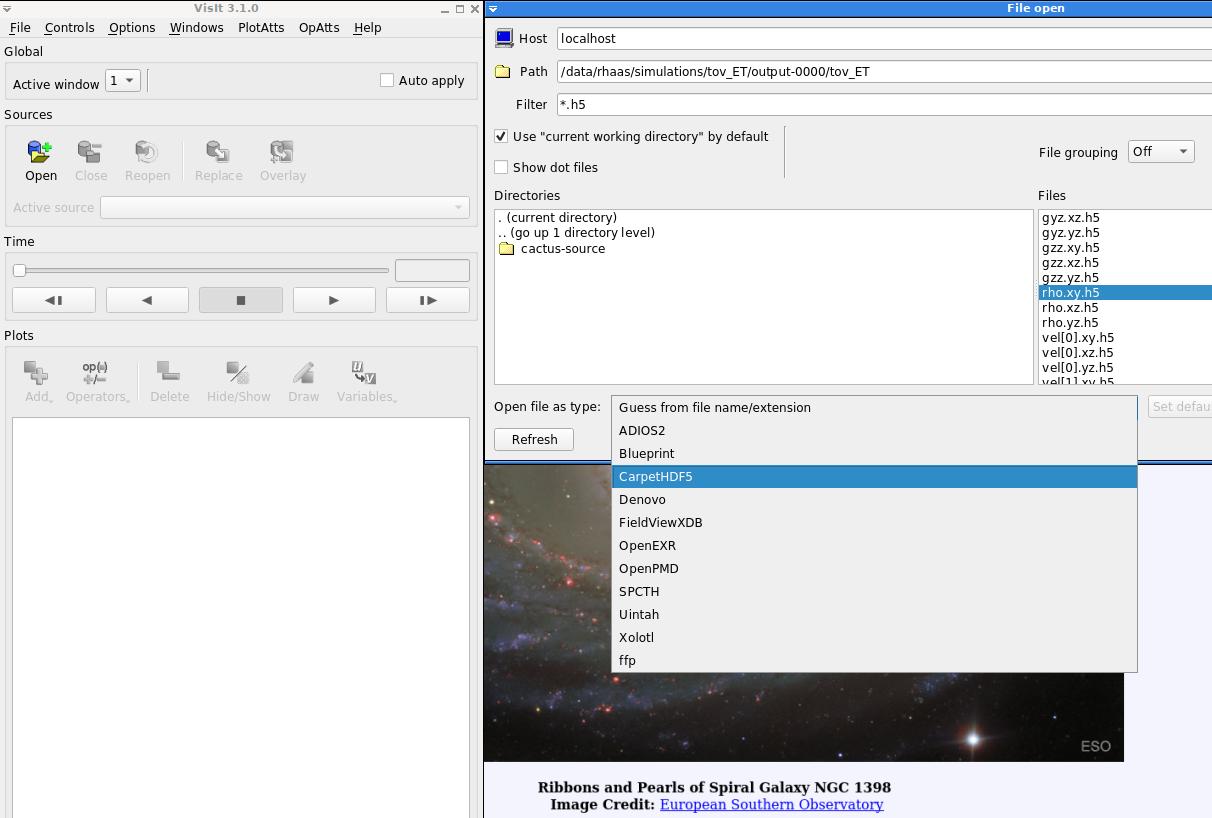
Just for completeness' sake I am attaching a screenshot showing where CarpetHDF5 shows up for me.
Yours, Roland
Hi Roland,
Thanks again for your email.
I have VisIt 3 and ETK Mayer downloaded which I believe doesn't have CarpetHDF5. How do I use the CarpetHDF5 reader? Do I need to install it from https://bitbucket.org/rhaas80/carpethdf5/src/multifile/ or is
there a
newer version?
That is still the newest version. Though I do not know of that version will compile with VisIt 3 (it may have changed the plugin interfaces).
I had a look at VisIt 3.1 ( https://github.com/visit-dav/visit/releases/download/v3.1.0/visit3_1_0.linux... since I run Debian) and as far as I can tell that one includes the CarpetHDF5 reader in
visit3_1_0.linux-x86_64/3.1.0/linux-x86_64/plugins/databases/libMCarpetHDF5Database.so
I installed VisIt 3.1.0 from the link. I tried running the visualization script with it and that gives me errors. The issue still seems to be about reading Carpet HDF5 files.
VisIt: Error - VisIt could not read from the file "/afs/ crc.nd.edu/user/a/akedia/simulations/nsnstohmns_in_saeng/output-0000/nsnstohmns/rho.xy.h5 ".
The generated error message was:
There was an error opening /afs/ crc.nd.edu/user/a/akedia/simulations/nsnstohmns_in_saeng/output-0000/nsnstohmns/rho.xy.h5. It may be an invalid file. VisIt tried using the following file format readers to open the file: <No suitable plugins were identified> VisIt: Error - Cannot create a plot until a database has been opened.
For assurance, I checked that the installed version of VisIt 3.1.0 has a folder on CarpetHDF5 in : visit/3.1.0/visit3.1.0/src/databases/CarpetHDF5 Should this be the only folder with CarpetHDF5 created?
As to s.screenCapture, it was by default set to 0 , I have attached a
sample image. setting s.screenCapture = 1 gives empty images, so does not fix the
problem. I see. The first step will then be to try and see if you can load a Carpet HDF5 file in the GUI to make sure that at least in principle you should be able to load a file (as compared to there being a scripting issue).
You should also make sure that when the script runs the file is actually opened by CarpetHDF5 and not some other plugin that can read HDF5 files (PIXIE is often doing this). I believe there is some output to screen about which reader is used.
On trying to load a file on Visit GUI I get this error message:
VisIt could not read from the file "/afs/ crc.nd.edu/user/a/akedia/simulations/nsnstohmns_in_saeng/output-0000/nsnstohmns/rho.xy.h5 ".
The generated error message was:
There was an error opening /afs/ crc.nd.edu/user/a/akedia/simulations/nsnstohmns_in_saeng/output-0000/nsnstohmns/rho.xy.h5. It may be an invalid file. VisIt tried using the following file format readers to open the file: <No suitable plugins were identified>
And when I'm selecting the file, there is no option for CarpetHDF5 in the dropdown list of supported file name/extension.
Thank you for your help, Atul
Hi Roland,
Hi Erik,
Thanks again for your email, these are very helpful.
I found my mistake: previously we(me and my colleague at Notre Dame) had installed the Debian version of visit 3.1.0(134a7fd ) on our RHEL cluster. So we reinstalled the RHEL version from ( https://wci.llnl.gov/simulation/computer-codes/visit/executables) now. So now, when I open VisIt, I do get CarpetHDF5 as a supported extension. CarpetHDF5 is also enabled in "Options/Plugin Manager" menu. And my VisIt GUI looks like the screenshot from Rolandlast email. But now I get a new error, when I try to load rho.xy.h5 directly on the VisIt GUI: - - - - - - - - - - - - - - - - - - - - - - - - - - - - - - - - - - - - Error opening plugin file: ... /visit/3.1.0/3.1.0/linux-x86_64/plugins/databases/libMADIOS2Database.so (libfabric.so.1: cannot open shared object file: No such file or directory) - - - - - - - - - - - - - - - - - - - - - - - - - - - - - - - - - - - - Along with the RHEL version we also tried Fedora and CentOS just because they are related, but getting the same error.
I think this error of "libfabric.so" missing is because the VisIt files from here (https://wci.llnl.gov/simulation/computer-codes/visit/executables) are pre-compiled on Intel machines, and our cluster is a different machine. We are still trying to see if there is a workaround for "libfabric.so", or if we can compile visit directly on our machine.
I currently don't have the tool "h5format_convert". I will try to get it as soon as we get the libfabric.so issue fixed.
Yours sincerely, Atul.
On Mon, Feb 3, 2020 at 3:03 PM Roland Haas rhaas@illinois.edu wrote:
Hello Atul,
as far as I can tell VisIt 3.1.0 binary available from the VisIt downloads page (https://wci.llnl.gov/simulation/computer-codes/visit/executables) for Linux (Debian 9.0 64bit specifically) does have the plugin included.
To check you should see if there are files
visit3_1_0.linux-x86_64/3.1.0/linux-x86_64/plugins/databases/libECarpetHDF5Database_ser.so
visit3_1_0.linux-x86_64/3.1.0/linux-x86_64/plugins/databases/libECarpetHDF5Database_par.so
visit3_1_0.linux-x86_64/3.1.0/linux-x86_64/plugins/databases/libICarpetHDF5Database.so
visit3_1_0.linux-x86_64/3.1.0/linux-x86_64/plugins/databases/libMCarpetHDF5Database.so
which are the compiled shared libraries (not the src files). I can confirm that that plugin can read in CarpetHDF5 files (did so today).
This is for VisIt 3.1.0 git version 134a7fd (according to the about dialog).
I would check that you have not disabled the CarpetHDF5 database plugin in the "Options/Plugin Manager" menu.
Other than that I am not sure at all what could be happening. I have seem issues with HDF5 files being of too new a format (eg if ldd cactus_sim reports libhdf5.so.10 but "ls visit3_1_0.linux-x86_64/3.1.0/linux-x86_64/lib/libhdf5.so.*" is less than 10) but that does not (as far as I know) affect Cactus since we ask the newer libraries to write files readable by the old versions.
Just for completeness' sake I am attaching a screenshot showing where CarpetHDF5 shows up for me.
Yours, Roland
Hi Roland,
Thanks again for your email.
I have VisIt 3 and ETK Mayer downloaded which I believe doesn't have CarpetHDF5. How do I use the CarpetHDF5 reader? Do I need to install
it
from https://bitbucket.org/rhaas80/carpethdf5/src/multifile/ or is
there a
newer version?
That is still the newest version. Though I do not know of that version will compile with VisIt 3 (it may have changed the plugin interfaces).
I had a look at VisIt 3.1 (
https://github.com/visit-dav/visit/releases/download/v3.1.0/visit3_1_0.linux...
since I run Debian) and as far as I can tell that one includes the CarpetHDF5 reader in
visit3_1_0.linux-x86_64/3.1.0/linux-x86_64/plugins/databases/libMCarpetHDF5Database.so
I installed VisIt 3.1.0 from the link. I tried running the visualization script with it and that gives me errors. The issue still seems to be
about
reading Carpet HDF5 files.
VisIt: Error - VisIt could not read from the file "/afs/
crc.nd.edu/user/a/akedia/simulations/nsnstohmns_in_saeng/output-0000/nsnstohmns/rho.xy.h5
".
The generated error message was:
There was an error opening /afs/
crc.nd.edu/user/a/akedia/simulations/nsnstohmns_in_saeng/output-0000/nsnstohmns/rho.xy.h5 .
It may be an invalid file. VisIt tried using the following file format readers to open the file: <No suitable plugins were identified> VisIt: Error - Cannot create a plot until a database has been opened.
For assurance, I checked that the installed version of VisIt 3.1.0 has a folder on CarpetHDF5 in : visit/3.1.0/visit3.1.0/src/databases/CarpetHDF5 Should this be the only folder with CarpetHDF5 created?
As to s.screenCapture, it was by default set to 0 , I have attached a
sample image. setting s.screenCapture = 1 gives empty images, so does not fix the
problem. I see. The first step will then be to try and see if you can load a Carpet HDF5 file in the GUI to make sure that at least in principle you should be able to load a file (as compared to there being a scripting issue).
You should also make sure that when the script runs the file is actually opened by CarpetHDF5 and not some other plugin that can read HDF5 files (PIXIE is often doing this). I believe there is some output to screen about which reader is used.
On trying to load a file on Visit GUI I get this error message:
VisIt could not read from the file "/afs/
crc.nd.edu/user/a/akedia/simulations/nsnstohmns_in_saeng/output-0000/nsnstohmns/rho.xy.h5
".
The generated error message was:
There was an error opening /afs/
crc.nd.edu/user/a/akedia/simulations/nsnstohmns_in_saeng/output-0000/nsnstohmns/rho.xy.h5 .
It may be an invalid file. VisIt tried using the following file format readers to open the file: <No suitable plugins were identified>
And when I'm selecting the file, there is no option for CarpetHDF5 in the dropdown list of supported file name/extension.
Thank you for your help, Atul
-- My email is as private as my paper mail. I therefore support encrypting and signing email messages. Get my PGP key from http://pgp.mit.edu .
Hello Atul,
the easiest way around this is likely to disable the "ADIOS2" database in the "Options/Plugin Manager" menu.
You may even have to remove all
/visit/3.1.0/3.1.0/linux-x86_64/plugins/databases/lib?ADIOS2Database.so
where the ? stands for "M" or "E" or "I".
libfabric is used for infiniband and some other network types and indeed I have seen that missing on (workstations mostly) before. It is usually used by MPI so I am not quite sure why lib?ADIOS2Database.so would use it (given that none of the Linux VisIt executables available for download seem MPI enabled).
Yours, Roland
Hi Roland,
Hi Erik,
Thanks again for your email, these are very helpful.
I found my mistake: previously we(me and my colleague at Notre Dame) had installed the Debian version of visit 3.1.0(134a7fd ) on our RHEL cluster. So we reinstalled the RHEL version from ( https://wci.llnl.gov/simulation/computer-codes/visit/executables) now. So now, when I open VisIt, I do get CarpetHDF5 as a supported extension. CarpetHDF5 is also enabled in "Options/Plugin Manager" menu. And my VisIt GUI looks like the screenshot from Rolandlast email. But now I get a new error, when I try to load rho.xy.h5 directly on the VisIt GUI:
Error opening plugin file: ... /visit/3.1.0/3.1.0/linux-x86_64/plugins/databases/libMADIOS2Database.so (libfabric.so.1: cannot open shared object file: No such file or directory)
Along with the RHEL version we also tried Fedora and CentOS just because they are related, but getting the same error.
I think this error of "libfabric.so" missing is because the VisIt files from here (https://wci.llnl.gov/simulation/computer-codes/visit/executables) are pre-compiled on Intel machines, and our cluster is a different machine. We are still trying to see if there is a workaround for "libfabric.so", or if we can compile visit directly on our machine.
I currently don't have the tool "h5format_convert". I will try to get it as soon as we get the libfabric.so issue fixed.
Yours sincerely, Atul.
On Mon, Feb 3, 2020 at 3:03 PM Roland Haas rhaas@illinois.edu wrote:
Hello Atul,
as far as I can tell VisIt 3.1.0 binary available from the VisIt downloads page (https://wci.llnl.gov/simulation/computer-codes/visit/executables) for Linux (Debian 9.0 64bit specifically) does have the plugin included.
To check you should see if there are files
visit3_1_0.linux-x86_64/3.1.0/linux-x86_64/plugins/databases/libECarpetHDF5Database_ser.so
visit3_1_0.linux-x86_64/3.1.0/linux-x86_64/plugins/databases/libECarpetHDF5Database_par.so
visit3_1_0.linux-x86_64/3.1.0/linux-x86_64/plugins/databases/libICarpetHDF5Database.so
visit3_1_0.linux-x86_64/3.1.0/linux-x86_64/plugins/databases/libMCarpetHDF5Database.so
which are the compiled shared libraries (not the src files). I can confirm that that plugin can read in CarpetHDF5 files (did so today).
This is for VisIt 3.1.0 git version 134a7fd (according to the about dialog).
I would check that you have not disabled the CarpetHDF5 database plugin in the "Options/Plugin Manager" menu.
Other than that I am not sure at all what could be happening. I have seem issues with HDF5 files being of too new a format (eg if ldd cactus_sim reports libhdf5.so.10 but "ls visit3_1_0.linux-x86_64/3.1.0/linux-x86_64/lib/libhdf5.so.*" is less than 10) but that does not (as far as I know) affect Cactus since we ask the newer libraries to write files readable by the old versions.
Just for completeness' sake I am attaching a screenshot showing where CarpetHDF5 shows up for me.
Yours, Roland
Hi Roland,
Thanks again for your email.
I have VisIt 3 and ETK Mayer downloaded which I believe doesn't have CarpetHDF5. How do I use the CarpetHDF5 reader? Do I need to install
it
from https://bitbucket.org/rhaas80/carpethdf5/src/multifile/ or is
there a
newer version?
That is still the newest version. Though I do not know of that version will compile with VisIt 3 (it may have changed the plugin interfaces).
I had a look at VisIt 3.1 (
https://github.com/visit-dav/visit/releases/download/v3.1.0/visit3_1_0.linux...
since I run Debian) and as far as I can tell that one includes the CarpetHDF5 reader in
visit3_1_0.linux-x86_64/3.1.0/linux-x86_64/plugins/databases/libMCarpetHDF5Database.so
I installed VisIt 3.1.0 from the link. I tried running the visualization script with it and that gives me errors. The issue still seems to be
about
reading Carpet HDF5 files.
VisIt: Error - VisIt could not read from the file "/afs/
crc.nd.edu/user/a/akedia/simulations/nsnstohmns_in_saeng/output-0000/nsnstohmns/rho.xy.h5
".
The generated error message was:
There was an error opening /afs/
crc.nd.edu/user/a/akedia/simulations/nsnstohmns_in_saeng/output-0000/nsnstohmns/rho.xy.h5 .
It may be an invalid file. VisIt tried using the following file format readers to open the file: <No suitable plugins were identified> VisIt: Error - Cannot create a plot until a database has been opened.
For assurance, I checked that the installed version of VisIt 3.1.0 has a folder on CarpetHDF5 in : visit/3.1.0/visit3.1.0/src/databases/CarpetHDF5 Should this be the only folder with CarpetHDF5 created?
As to s.screenCapture, it was by default set to 0 , I have attached a
sample image. setting s.screenCapture = 1 gives empty images, so does not fix the
problem. I see. The first step will then be to try and see if you can load a Carpet HDF5 file in the GUI to make sure that at least in principle you should be able to load a file (as compared to there being a scripting issue).
You should also make sure that when the script runs the file is actually opened by CarpetHDF5 and not some other plugin that can read HDF5 files (PIXIE is often doing this). I believe there is some output to screen about which reader is used.
On trying to load a file on Visit GUI I get this error message:
VisIt could not read from the file "/afs/
crc.nd.edu/user/a/akedia/simulations/nsnstohmns_in_saeng/output-0000/nsnstohmns/rho.xy.h5
".
The generated error message was:
There was an error opening /afs/
crc.nd.edu/user/a/akedia/simulations/nsnstohmns_in_saeng/output-0000/nsnstohmns/rho.xy.h5 .
It may be an invalid file. VisIt tried using the following file format readers to open the file: <No suitable plugins were identified>
And when I'm selecting the file, there is no option for CarpetHDF5 in the dropdown list of supported file name/extension.
Thank you for your help, Atul
-- My email is as private as my paper mail. I therefore support encrypting and signing email messages. Get my PGP key from http://pgp.mit.edu .
Hi Roland,
Thanks for this excellent suggestion. We are working on getting Visit to work along with ffmpeg on our cluster. We realized we have some ffmpeg required libraries that are missing on our cluster.
A good news is that I am able to load files into the Visit GUI successfully.
I will let you know when I have more definite issues.
best regards, Atul
On Wed, Feb 5, 2020 at 2:57 PM Roland Haas rhaas@illinois.edu wrote:
Hello Atul,
the easiest way around this is likely to disable the "ADIOS2" database in the "Options/Plugin Manager" menu.
You may even have to remove all
/visit/3.1.0/3.1.0/linux-x86_64/plugins/databases/lib?ADIOS2Database.so
where the ? stands for "M" or "E" or "I".
libfabric is used for infiniband and some other network types and indeed I have seen that missing on (workstations mostly) before. It is usually used by MPI so I am not quite sure why lib?ADIOS2Database.so would use it (given that none of the Linux VisIt executables available for download seem MPI enabled).
Yours, Roland
Hi Roland,
Hi Erik,
Thanks again for your email, these are very helpful.
I found my mistake: previously we(me and my colleague at Notre Dame) had installed the Debian version of visit 3.1.0(134a7fd ) on our RHEL
cluster.
So we reinstalled the RHEL version from ( https://wci.llnl.gov/simulation/computer-codes/visit/executables) now. So now, when I open VisIt, I do get CarpetHDF5 as a supported extension. CarpetHDF5 is also enabled in "Options/Plugin Manager" menu. And my VisIt GUI looks like the screenshot from Rolandlast email. But now I get a new error, when I try to load rho.xy.h5 directly on the VisIt GUI:
Error opening plugin file: ... /visit/3.1.0/3.1.0/linux-x86_64/plugins/databases/libMADIOS2Database.so (libfabric.so.1: cannot open shared object file: No such file or
directory)
Along with the RHEL version we also tried Fedora and CentOS just because they are related, but getting the same error.
I think this error of "libfabric.so" missing is because the VisIt files from here (
https://wci.llnl.gov/simulation/computer-codes/visit/executables)
are pre-compiled on Intel machines, and our cluster is a different
machine.
We are still trying to see if there is a workaround for "libfabric.so",
or
if we can compile visit directly on our machine.
I currently don't have the tool "h5format_convert". I will try to get it
as
soon as we get the libfabric.so issue fixed.
Yours sincerely, Atul.
On Mon, Feb 3, 2020 at 3:03 PM Roland Haas rhaas@illinois.edu wrote:
Hello Atul,
as far as I can tell VisIt 3.1.0 binary available from the VisIt downloads page (https://wci.llnl.gov/simulation/computer-codes/visit/executables) for Linux (Debian 9.0 64bit specifically) does have the plugin included.
To check you should see if there are files
visit3_1_0.linux-x86_64/3.1.0/linux-x86_64/plugins/databases/libECarpetHDF5Database_ser.so
visit3_1_0.linux-x86_64/3.1.0/linux-x86_64/plugins/databases/libECarpetHDF5Database_par.so
visit3_1_0.linux-x86_64/3.1.0/linux-x86_64/plugins/databases/libICarpetHDF5Database.so
visit3_1_0.linux-x86_64/3.1.0/linux-x86_64/plugins/databases/libMCarpetHDF5Database.so
which are the compiled shared libraries (not the src files). I can confirm that that plugin can read in CarpetHDF5 files (did so today).
This is for VisIt 3.1.0 git version 134a7fd (according to the about dialog).
I would check that you have not disabled the CarpetHDF5 database plugin in the "Options/Plugin Manager" menu.
Other than that I am not sure at all what could be happening. I have seem issues with HDF5 files being of too new a format (eg if ldd cactus_sim reports libhdf5.so.10 but "ls visit3_1_0.linux-x86_64/3.1.0/linux-x86_64/lib/libhdf5.so.*" is less
than
- but that does not (as far as I know) affect Cactus since
we ask the newer libraries to write files readable by the old versions.
Just for completeness' sake I am attaching a screenshot showing where CarpetHDF5 shows up for me.
Yours, Roland
Hi Roland,
Thanks again for your email.
I have VisIt 3 and ETK Mayer downloaded which I believe doesn't
have
CarpetHDF5. How do I use the CarpetHDF5 reader? Do I need to
install
it
from https://bitbucket.org/rhaas80/carpethdf5/src/multifile/ or
is
there a
newer version?
That is still the newest version. Though I do not know of that
version
will compile with VisIt 3 (it may have changed the plugin
interfaces).
I had a look at VisIt 3.1 (
https://github.com/visit-dav/visit/releases/download/v3.1.0/visit3_1_0.linux...
since I run Debian) and as far as I can tell that one includes the CarpetHDF5 reader in
visit3_1_0.linux-x86_64/3.1.0/linux-x86_64/plugins/databases/libMCarpetHDF5Database.so
I installed VisIt 3.1.0 from the link. I tried running the
visualization
script with it and that gives me errors. The issue still seems to
be
about
reading Carpet HDF5 files.
VisIt: Error - VisIt could not read from the file "/afs/
crc.nd.edu/user/a/akedia/simulations/nsnstohmns_in_saeng/output-0000/nsnstohmns/rho.xy.h5
".
The generated error message was:
There was an error opening /afs/
crc.nd.edu/user/a/akedia/simulations/nsnstohmns_in_saeng/output-0000/nsnstohmns/rho.xy.h5
.
It may be an invalid file. VisIt tried using the following file format readers to open the
file: <No
suitable plugins were identified> VisIt: Error - Cannot create a plot until a database has been opened.
For assurance, I checked that the installed version of VisIt 3.1.0
has a
folder on CarpetHDF5 in : visit/3.1.0/visit3.1.0/src/databases/CarpetHDF5 Should this be the only folder with CarpetHDF5 created?
As to s.screenCapture, it was by default set to 0 , I have
attached a
sample image. setting s.screenCapture = 1 gives empty images, so does not fix
the
problem. I see. The first step will then be to try and see if you can load a Carpet HDF5 file in the GUI to make sure that at least in
principle you
should be able to load a file (as compared to there being a
scripting
issue).
You should also make sure that when the script runs the file is actually opened by CarpetHDF5 and not some other plugin that can
read
HDF5 files (PIXIE is often doing this). I believe there is some
output
to screen about which reader is used.
On trying to load a file on Visit GUI I get this error message:
VisIt could not read from the file "/afs/
crc.nd.edu/user/a/akedia/simulations/nsnstohmns_in_saeng/output-0000/nsnstohmns/rho.xy.h5
".
The generated error message was:
There was an error opening /afs/
crc.nd.edu/user/a/akedia/simulations/nsnstohmns_in_saeng/output-0000/nsnstohmns/rho.xy.h5
.
It may be an invalid file. VisIt tried using the following file format readers to open the
file: <No
suitable plugins were identified>
And when I'm selecting the file, there is no option for CarpetHDF5
in the
dropdown list of supported file name/extension.
Thank you for your help, Atul
-- My email is as private as my paper mail. I therefore support encrypting and signing email messages. Get my PGP key from http://pgp.mit.edu .
-- My email is as private as my paper mail. I therefore support encrypting and signing email messages. Get my PGP key from http://pgp.mit.edu .

Atul
Since VisIt did not try any file readers (and there should be several that are using HDF5), maybe the problem is that you are using a newer HDF5 binary format that is not understood by the older HDF5 library that VisIt might be using? Do you have access to a tool called "h5format_convert", and if so, can you apply it to your HDF5 files?
-erik
On Mon, Feb 3, 2020 at 2:03 PM Atul Kedia akedia@nd.edu wrote:
Hi Roland,
Thanks again for your email.
I have VisIt 3 and ETK Mayer downloaded which I believe doesn't have CarpetHDF5. How do I use the CarpetHDF5 reader? Do I need to install it from https://bitbucket.org/rhaas80/carpethdf5/src/multifile/ or is there a newer version?
That is still the newest version. Though I do not know of that version will compile with VisIt 3 (it may have changed the plugin interfaces).
I had a look at VisIt 3.1 (https://github.com/visit-dav/visit/releases/download/v3.1.0/visit3_1_0.linux... since I run Debian) and as far as I can tell that one includes the CarpetHDF5 reader in visit3_1_0.linux-x86_64/3.1.0/linux-x86_64/plugins/databases/libMCarpetHDF5Database.so
I installed VisIt 3.1.0 from the link. I tried running the visualization script with it and that gives me errors. The issue still seems to be about reading Carpet HDF5 files.
VisIt: Error - VisIt could not read from the file "/afs/crc.nd.edu/user/a/akedia/simulations/nsnstohmns_in_saeng/output-0000/nsnstohmns/rho.xy.h5".
The generated error message was:
There was an error opening /afs/crc.nd.edu/user/a/akedia/simulations/nsnstohmns_in_saeng/output-0000/nsnstohmns/rho.xy.h5. It may be an invalid file. VisIt tried using the following file format readers to open the file: <No suitable plugins were identified> VisIt: Error - Cannot create a plot until a database has been opened.
For assurance, I checked that the installed version of VisIt 3.1.0 has a folder on CarpetHDF5 in : visit/3.1.0/visit3.1.0/src/databases/CarpetHDF5 Should this be the only folder with CarpetHDF5 created?
As to s.screenCapture, it was by default set to 0 , I have attached a sample image. setting s.screenCapture = 1 gives empty images, so does not fix the problem.
I see. The first step will then be to try and see if you can load a Carpet HDF5 file in the GUI to make sure that at least in principle you should be able to load a file (as compared to there being a scripting issue).
You should also make sure that when the script runs the file is actually opened by CarpetHDF5 and not some other plugin that can read HDF5 files (PIXIE is often doing this). I believe there is some output to screen about which reader is used.
On trying to load a file on Visit GUI I get this error message:
VisIt could not read from the file "/afs/crc.nd.edu/user/a/akedia/simulations/nsnstohmns_in_saeng/output-0000/nsnstohmns/rho.xy.h5".
The generated error message was:
There was an error opening /afs/crc.nd.edu/user/a/akedia/simulations/nsnstohmns_in_saeng/output-0000/nsnstohmns/rho.xy.h5. It may be an invalid file. VisIt tried using the following file format readers to open the file: <No suitable plugins were identified>
And when I'm selecting the file, there is no option for CarpetHDF5 in the dropdown list of supported file name/extension.
Thank you for your help, Atul _______________________________________________ Users mailing list Users@einsteintoolkit.org http://lists.einsteintoolkit.org/mailman/listinfo/users
users@lists.einsteintoolkit.org
-
 Atul Kedia
 -
 Erik Schnetter
 -
 Haas, Roland
 -
Roland Haas